
This is an old revision of the document!
Model Rotation
Using Model Rotation
It can be handy to use a different model orientation than the default one (Y-axis pointing to North).
For example if a street canyon is analysed that has a different orientation, it is not clever to turn the buildings lining the street into “steps”.
As the correct interpretation of the sign of rotation is sometimes a bit tricky, have a look at the following sketch:
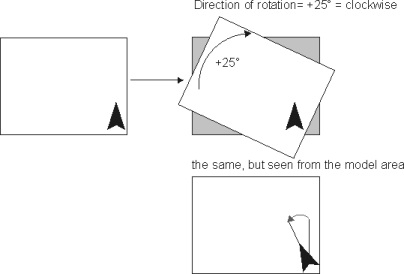
The model area (white square) in this example is rotated 25° clockwise above the original map (grey square). The direction is always related to the model area, not to the map.
So if you want to fit the map to your model area, you have to turn it exactly in the counter-direction ! Also, if you draw a north-arrow in your model area, a clockwise rotation will cause an anti-clockwise turn of the north arrow!
Confusing, I know…
To change the model orientation, use the ENVI-met Editor.
All input and output values are referring to the normal co-ordinate system.
A wind direction of 90 degrees for example means that the wind comes from the east. If the model is rotated, this does not automatically mean that it comes from the right model side!